
AI Support Agent
Instant answers,
straight from your docs.
Most support questions are already answered somewhere in your docs. The AI agent finds that answer, replies in seconds with the source cited, and hands off to your team the moment it isn't sure, so customers wait less and your team does less repeat work.
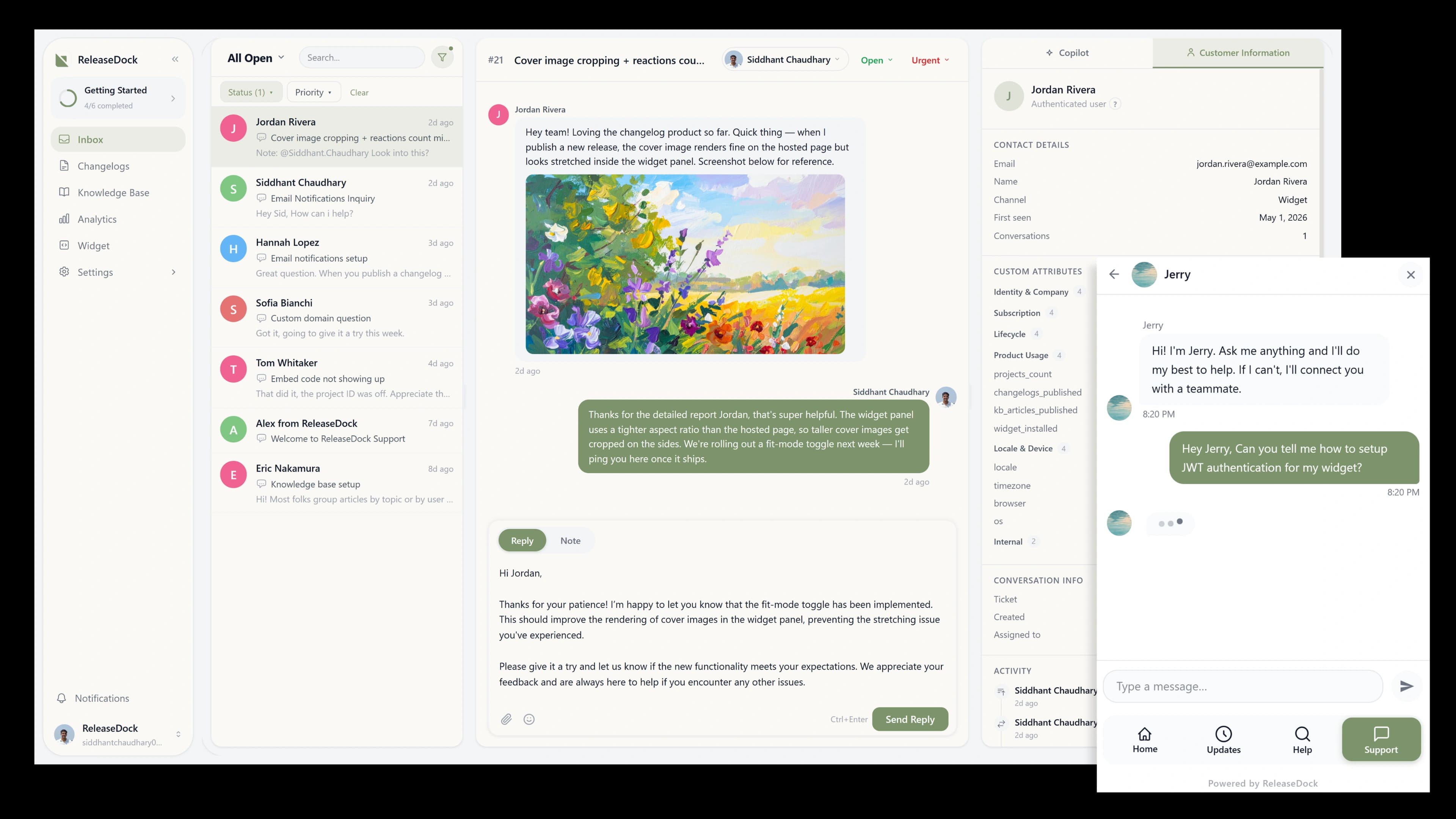
From zero to AI support in five minutes
No model training, no prompt engineering, no data pipeline, just your existing docs, put to work.
Enable the agent
Toggle it on, add a product description, set the tone, and add any custom instructions you want it to follow.
Publish your docs
Every article and announcement you publish is embedded automatically. No model training, no CSV upload, no waiting.
Customers get answers
Questions in the widget are answered in seconds, with sources cited. Anything it can't resolve escalates with full context.
Grounded in your docs. Helpful on both sides.
The agent answers customers in the widget from content you already wrote, and the same engine rides along as a Copilot for your team in the inbox.
Inbox Copilot
The same engine makes your team faster
AI support isn't only customer-facing. When a conversation reaches the inbox, the Copilot summarizes the thread and drafts a grounded reply for an agent to review, so even the tickets the AI escalates close faster than before.
- One-click thread summaries for long or reassigned conversations
- Draft replies grounded in your help center, ready to edit and send
- Article lookup without leaving the conversation
Everything else you get
Trained on your content
Every published article and announcement is embedded automatically, no separate training step, no CSV upload.
Source citations
Every answer links to the article it came from, so customers can verify and you can see which docs do the work.
Confident escalation
Low confidence or an explicit request for a person triggers a clean handoff, full transcript attached.
Usage you can see
Every AI conversation is counted in your dashboard against a monthly allowance, so you always know your volume and spend before the invoice lands.
Your voice, your rules
Set the tone, add custom instructions, define product context, and name the agent. It sounds like your team.
Always current
Publish a doc and the agent knows it. No retraining cycle, your support gets smarter the moment you write.
Questions, answered
The practical details, before you sign up.
What does the agent answer from?
Every published knowledge base article and announcement is embedded and searchable. The agent retrieves the most relevant passages and answers from them, so its knowledge is exactly as good as your docs, and improves every time you publish.
Can it make things up?
It answers only from retrieved content and cites the source. If nothing relevant clears the similarity threshold, it escalates to a human instead of guessing, which means no confidently wrong answers in front of your customers.
How does escalation work?
When the agent isn't confident, including when a customer explicitly asks for a person, it hands off, and a real support conversation is created with the full AI transcript attached. The handoff is seamless; the customer never repeats themselves.
What is the inbox Copilot?
The same intelligence, agent-facing. Inside a conversation it summarizes the thread, drafts a reply grounded in your docs, and finds the right article. Suggestions are advisory, your team reviews and sends, keeping a human firmly in the loop.
Can I control its tone and behavior?
Yes. Set the tone, add custom instructions, define your product context, and name the agent. It answers in your brand's voice, within the boundaries you set, not a generic chatbot bolted onto your site.
Does it replace my support team?
No, it removes the repetitive work. The agent handles the questions your docs already answer and routes everything else to your team with full context, so people spend their time on the hard, high-value problems instead of the FAQ.
Let your docs answer the questions for you.
Free for 7 days. No model training. No prompt engineering.
Free for 7 days · No credit card · 5-min setup