
Support
Support that scales
without the headcount.
Customers chat from your app and get an instant AI answer. Anything it can't resolve lands in one inbox with full context, attachments, and a Copilot that drafts the reply, so a small team handles the volume of a big one.
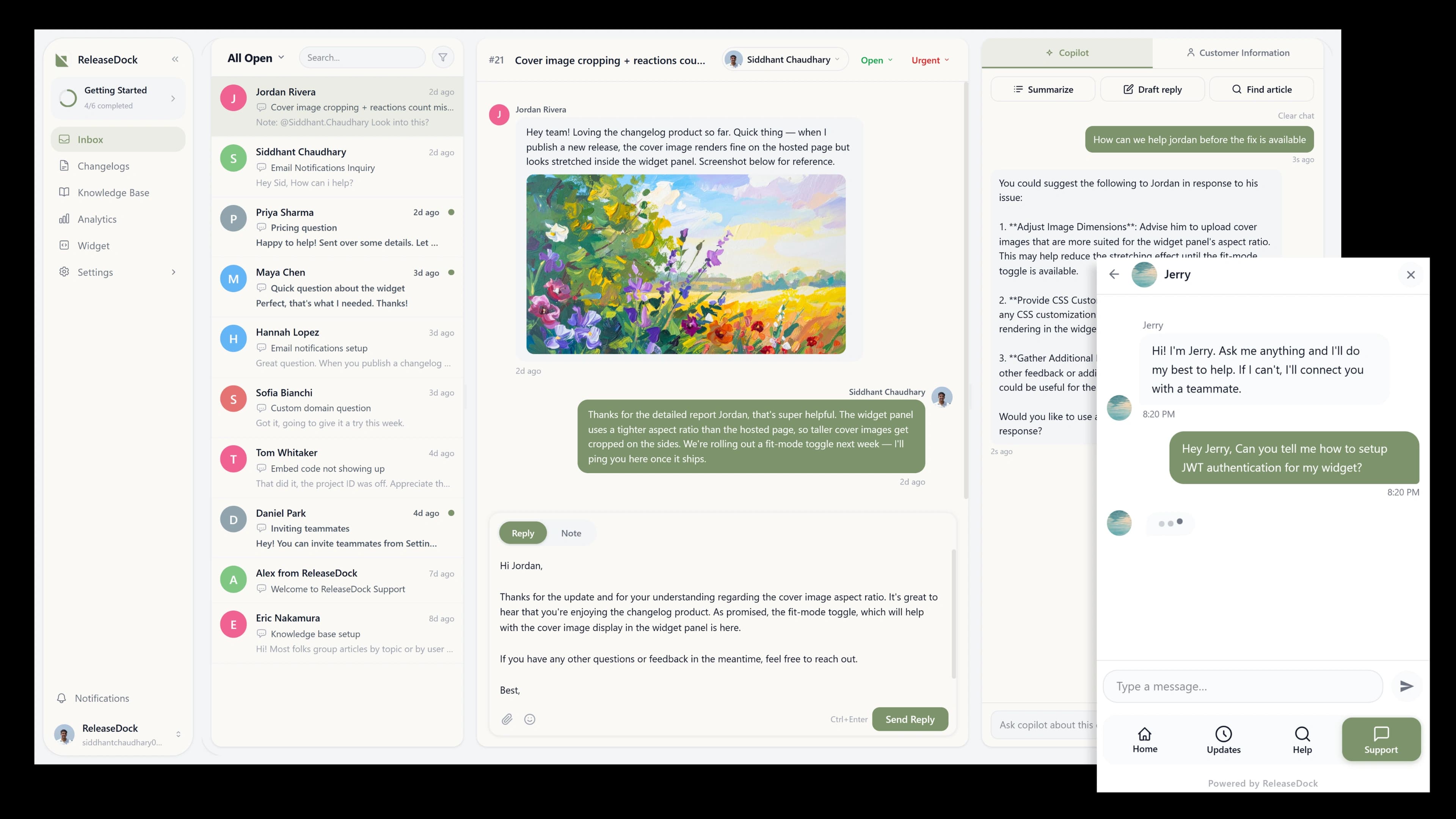
From question to resolution, with less in between
No ticketing system to configure, no queue software, no portal your customers have to log into.
A customer asks in the widget
They open the support tab and type. The AI agent answers from your help center and cites the source instantly.
Hard ones reach your inbox
When the AI isn't sure, it creates a real conversation with the full transcript and customer context attached.
Your team replies, faster
Copilot drafts a grounded reply for review. Send it, attach files if needed, the customer sees it in real time.
Answers first. Your team when it counts.
The AI agent clears the repetitive questions inside the widget. Everything else lands in one inbox where a Copilot helps your team reply in seconds.
Context
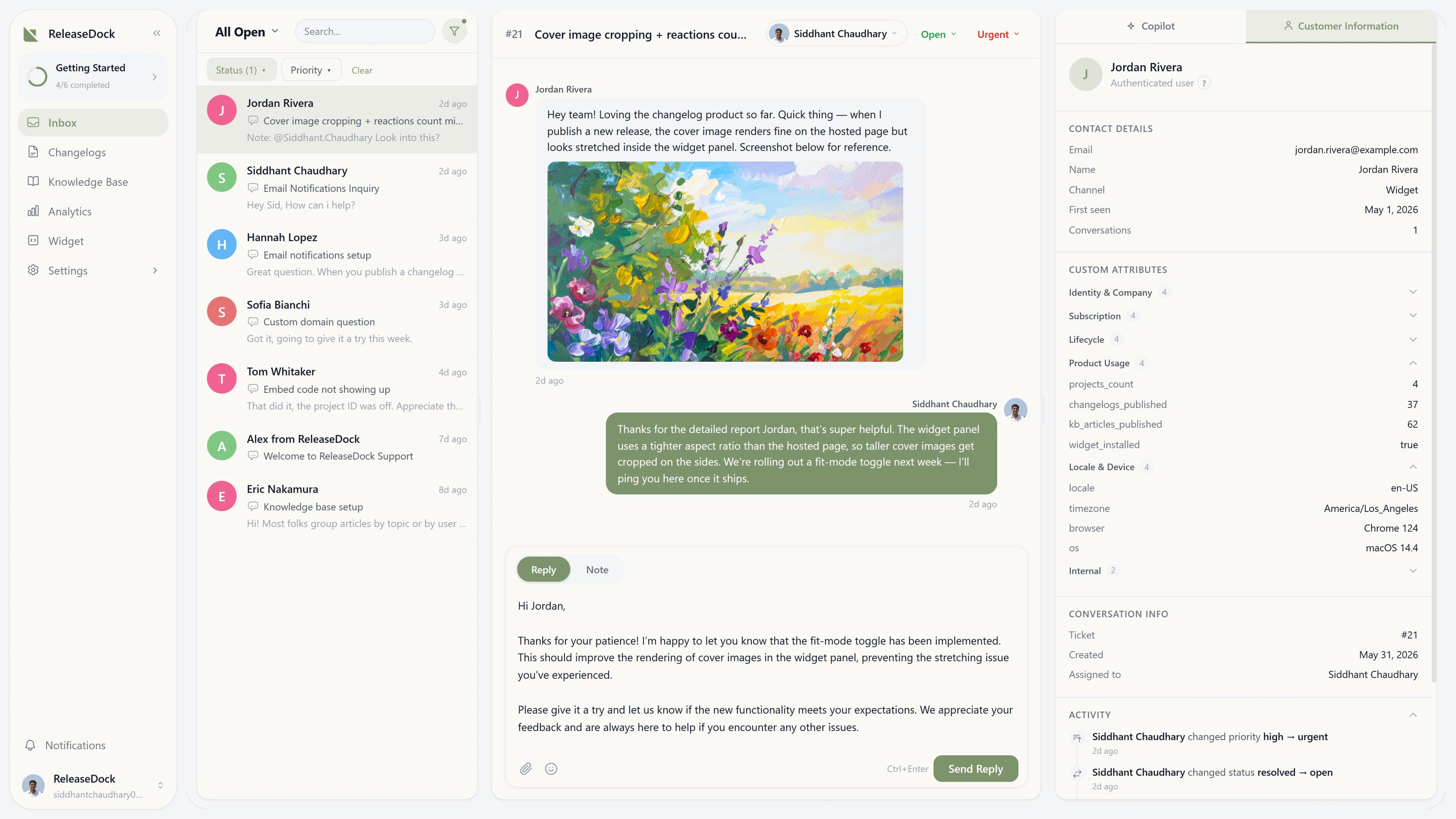
Know who you're talking to, instantly
In authenticated mode the widget passes a signed JWT, so a conversation arrives already tagged with the customer's identity and the attributes you choose to send. No more opening every reply with 'what's your account email?'
- Name, email, and any custom attributes, plan, account ID, signup date
- Full conversation history in one place, across sessions and channels
- Internal notes and assignment so the right teammate picks it up
In the widget
What your customer actually sees
No third-party portal, no redirect out of your app. Customers ask right where they hit the problem and get help in the same panel, which is exactly why they actually use it.
Everything else you get
AI answers up front
The agent clears the repetitive questions in the widget and only escalates, transcript attached, when it should.
One unified inbox
Every conversation in one place. Filter by status, assignee, or priority; sort by oldest unanswered. Nothing slips.
Inbox Copilot
Summarize a thread, draft a grounded reply, or find the article, without leaving the conversation. You always send.
File attachments
Both sides can attach screenshots and files. Most images render inline, so you see the bug without a download.
Assignment & notes
Route conversations, build personal queues, and leave internal notes the customer never sees.
Email channel
Inbound email lands in the same inbox. Reply from the dashboard; the customer gets a normal email thread.
Questions, answered
The practical details, before you sign up.
Do customers need an account to start a conversation?
No. In visitor mode anyone on your site can message anonymously. In authenticated mode their identity is attached automatically from a signed JWT, no signup form, no friction, just a message that already knows who sent it.
What does the AI agent handle before my team sees anything?
The AI agent answers from your help center inside the widget and cites the article it used. Only when it isn't confident does it hand off, and when it does, your team inherits the full transcript and customer context, so nobody starts from scratch.
What is the inbox Copilot?
An assistant inside every conversation. It can summarize a long thread, draft a reply grounded in your docs, and find the right article, without you leaving the inbox. Every suggestion is advisory; your team reviews and sends the final word.
Can I route conversations to the right teammate?
Yes. Assign any conversation, filter by 'assigned to me' for a personal queue, and reassign without losing history. Internal notes let the team coordinate privately on a thread the customer never sees.
Are file attachments supported?
Yes, both your team and your customers can attach images, screenshots, and documents. Most images render inline in the inbox, so you can see the bug without downloading anything.
How does the email channel work?
Inbound email lands in the same inbox as widget chats. You reply from the dashboard and the customer receives a normal email thread; threading and consolidation happen automatically, so one customer is one conversation regardless of channel.
Handle more support with the team you already have.
Free for 7 days. One script tag. No credit card.
Free for 7 days · No credit card · 5-min setup